XLSCOUT Platform Version Release 1.64
Major Updates in Techscaper LLM
1. Automated Alerts
You can now create your own alerts in Techscaper LLM. Build a query, choose the dates you want, and the alert will run the search for you automatically. You no longer need to run the same search again and again.
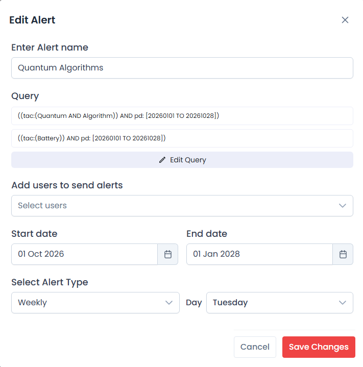
- Create your own alert — Go to Alerts (under RESULTS) and click Create a New Folder to set up a new alert. Give the alert a name that is easy to recognise.
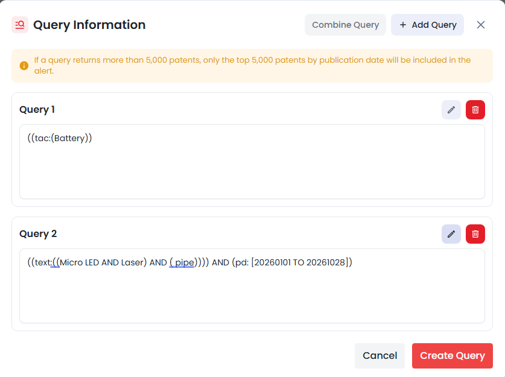
- Build your own query — Click Edit Query, then + Add Query to add a search. You can add more than one query to the same alert.
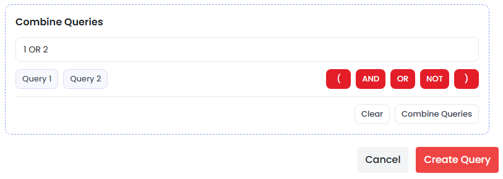
- Combine queries — Use the Combine Queries panel to join your queries with AND, OR, and NOT. For example, ( 1 AND 2 ) OR 3 returns patents that match both Query 1 and Query 2, together with patents that match Query 3.
- Choose your dates — Set a Start date and an End date. You receive alert results for the dates you choose.
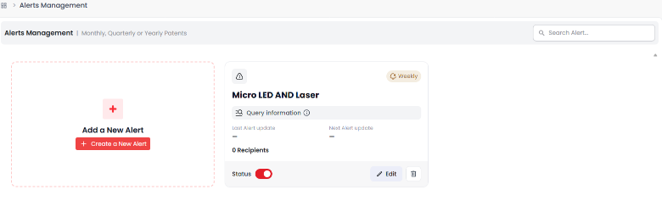
- All alerts in one place — Each alert is shown as a card on the Alerts page. The card shows the alert name, its queries, the Last Run and Next Run dates, and the number of recipients.
2. Choose how often you receive alerts
Alerts are now easier to manage. You decide how often each alert runs: weekly, monthly, or quarterly. Each alert can have its own schedule.
- Select Alert Type — Choose Weekly, Monthly, or Quarterly when you create or edit an alert.
- Choose the date — Pick the date on which the alert runs. The alert card then shows the Next Update of Alerts.
- Frequency on each card — Each alert card shows its frequency (for example, Weekly, Monthly), so you can see your schedules at a glance.
- Turn alerts on or off — Use the Status toggle on the alert card to pause or restart an alert.
- Edit and delete — Click Edit to change an alert’s query, users, dates, or frequency. Click the bin (trash) icon to delete it. Click Save Changes to save, or Cancel to close without saving.
TIP Switch an alert off instead of deleting it if you only need a short break. Its queries, users, and schedule are kept for when you turn it back on.
3. Improved Talk to Patents and Market Insights
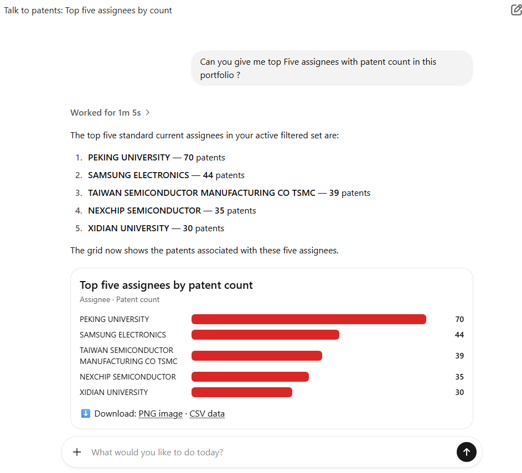
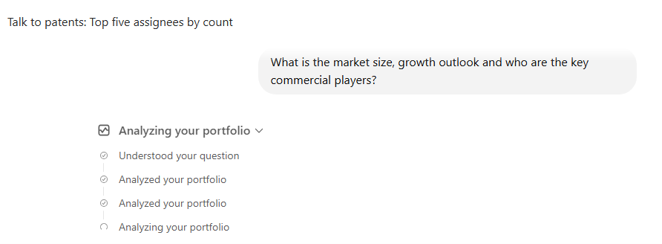
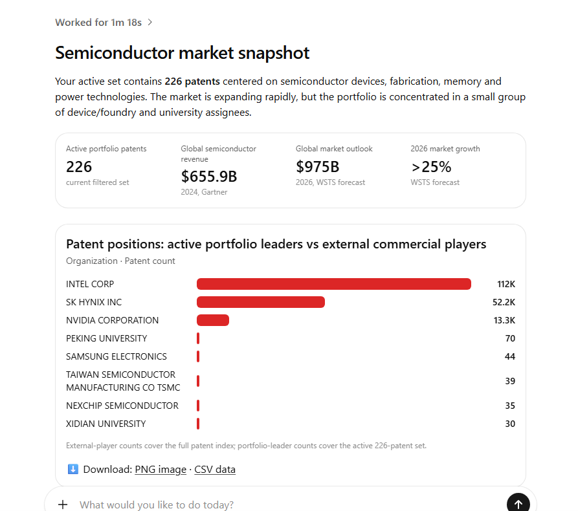
Talk to Patents and Market Insights now have an improved interface and better reasoning. It is easier to ask questions, and the answers are clearer and more reliable.
- Improved interface — The layout is cleaner, so it is easier to ask questions and read answers.
- Better reasoning — Answers are more accurate and better organised, and are based closely on the patents in your scope.
- Market Insights — Answers about companies and technology areas in your portfolio are more relevant and easier to follow.
ABOUTS US
XLSCOUT is an SOC2 Type II certified, integrated innovation & patent monetization platform at the forefront of the global innovation and IP industry, harnessing the potential of advanced Al technologies like Large Language Models (LLMs) and Generative Al for idea validation, optimizing ideation, creating high-value patents, and monetizing innovation.
- CANADA – Toronto, Ontario
Nucleus @ MaRS Waterfront, Waterfront Innovation Centre, Suite 200, Box 87 – 155, Queens Quay E, Toronto, ON M5A 0W4 - USA – Wilmington, Delaware
1000 North West Street Suite 1200 PMB # 4024, Wilmington DE 19801 - JAPAN – Chiyoda-Ku, Tokyo
XLSCOUT XLPAT G.K., Level 20, Marunouchi Trust Tower – Main 1-6-3 Marunouchi, Chiyoda-Ku, Tokyo, Japan – 100-0005 - INDIA – Mohali, Punjab
Unit 502-503, Tower A, 5th Floor, Bestech Business Tower, Mohali, Punjab – 160055 - GERMANY – Munich, Bavaria
Am Hirtenberg 13, 82064 Straßlach-Dingharting, Deutschland
Phone: +1 (647) 619-0002
Email: contact@xlscout.com
Copyrights © 2025 XLSCOUT. All Rights Reserved.