XLSCOUT Platform Version Release 1.60
Major Updates in StandiggerLLM: SEP Tagger Mapping & Reports
SEP Tagger now goes beyond tagging.
After a patent is tagged to a standard, you can generate a claim-element-level mapping against the matched specifications, review the evidence paragraph by paragraph, and export the results as a Standigger report or an Excel file.
What’s new in this release:
- One dashboard for your results with filters, notes and status for every patent.
- Generate mappings for individual claim elements against the identified standard specifications.
- View the AI-identified standards or add your own documents through PDF uploads or links.
- A Mapping Summary view showing the matched standard, specifications, mapping status and supporting evidence for every claim element.
- A Weighted Average score per patent to help prioritise results.
- Generate Standigger Report and Download Results in Excel.
1. Standigger Tagging Dashboard
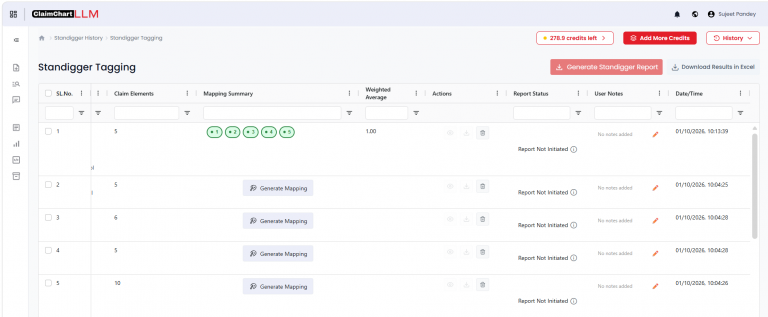
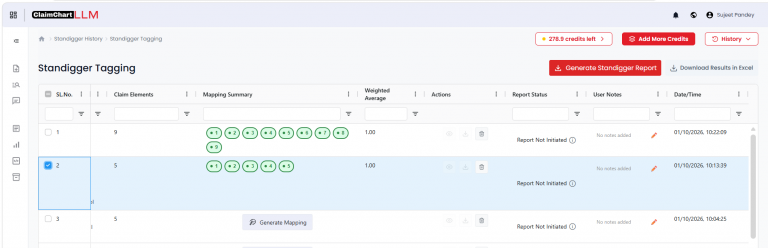
All your SEP Tagger results now live on a single Standigger Tagging dashboard, with one row per patent and a filter under every column
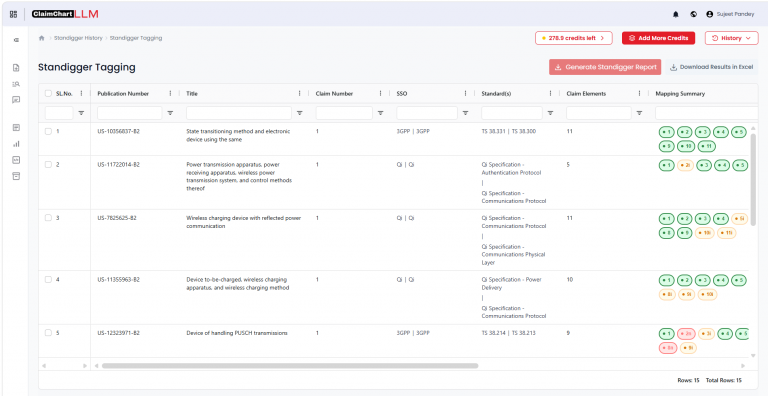
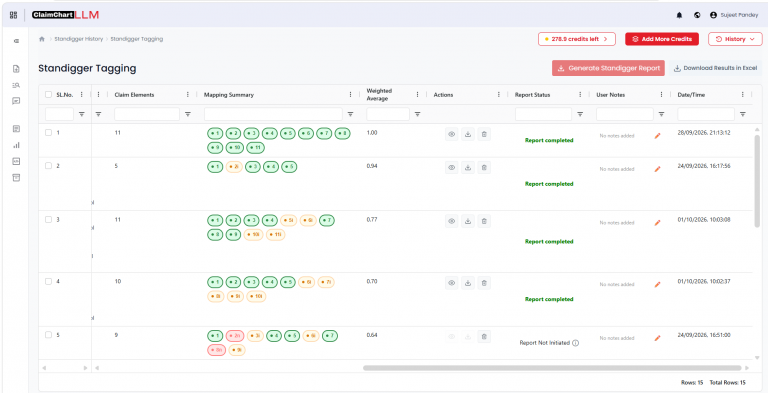
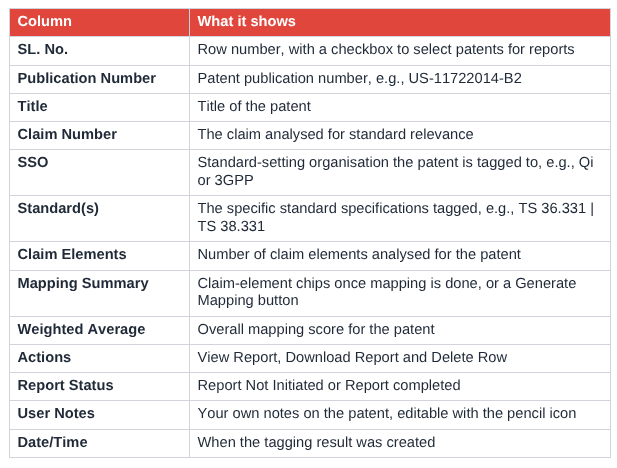
The footer shows the number of rows in the current view and the total rows.
2. Generate Mapping
Click Generate Mapping on any row to map that patent’s claim elements against the standard it was tagged to.
Update Standards before mapping
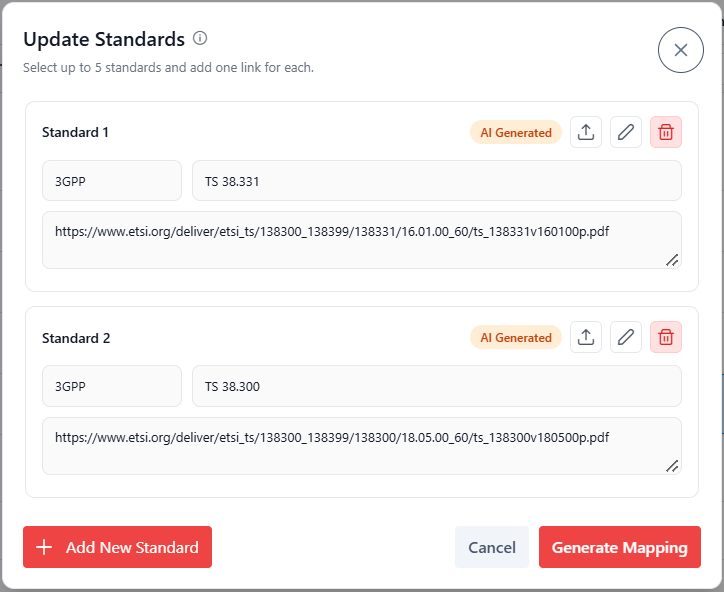
Before mapping starts, an Update Standards window lets you review and control which standard documents the patent is mapped against. You can select up to 5 standards and add one source for each.
- AI-generated standards: The standard identified by SEP Tagger is pre-filled with its standard body (for example, Qi) and specification (for example, Qi Specification – Communications Physical Layer), marked with an AI Generated tag.
- Upload a PDF: Click the upload icon to add your own copy of the standard document as a PDF.
- Add a link: Paste a URL to the standard document in the link field instead.
- Edit or remove: Use the pencil icon to change a standard, or the delete icon to remove it.
- Add New Standard: Click Add New Standard to map the patent against additional standards of your choice.
When your standards are ready, click Generate Mapping to start.
Once mapping is complete, the button is replaced by numbered chips in the Mapping Summary column, one per claim element (1, 2, 3 …). Green chips show fully mapped claim elements, while yellow chips marked with an “i” (for example, 5i) show claim elements that are only inferentially mapped. Click any chip to open the detailed Mapping Summary for that patent.
3. Mapping Summary View
The Mapping Summary window shows exactly where each claim element is found in the standard, with the evidence to back it up.
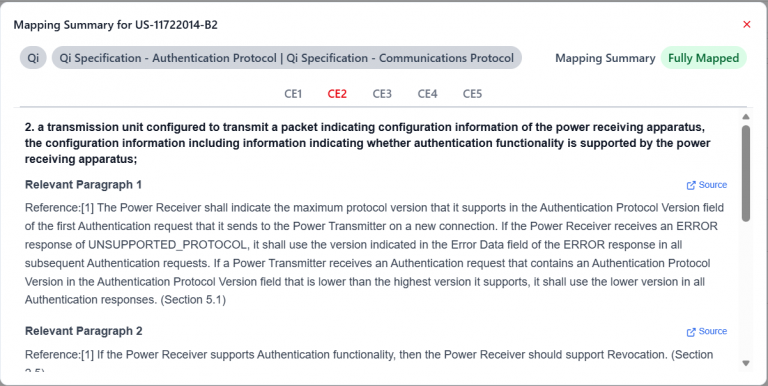
- Standard and specifications: The header shows the standard body the patent is tagged to (for example, Qi) and the specific specifications it was mapped against (for example, Qi Specification – Authentication Protocol and Communications Protocol).
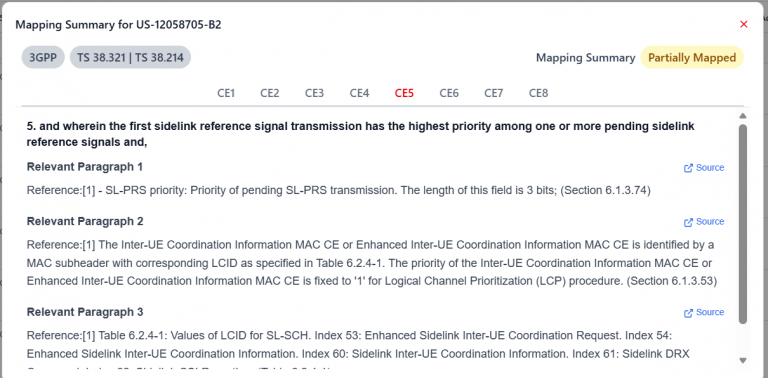
- Mapping status: A mapping summary badge tells you at a glance how well the claims are covered by the standard. Fully Mapped (green) means every claim element is supported by the specification. Partially Mapped (yellow) means only some claim elements are fully supported, so the patent needs closer expert review.
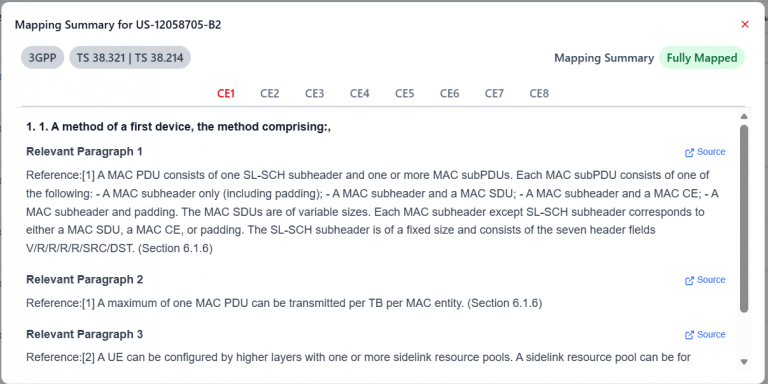
- Claim element tabs: Switch between CE1, CE2, CE3 and so on to review each claim element separately. The claim element text is shown at the top of each tab.
- Relevant paragraphs: Each claim element lists the most relevant passages from the specification, with the section or page number for easy reference.
- Source links: Click Source next to any paragraph to open the original specification text and verify the match.
Example of a partially mapped patent: In the example below, patent US-XXXXXXX-B2 is mapped to 3GPP TS 36.3XX and TS 38.3XX and marked Partially Mapped. Open the claim element tabs (here, CE5) to see which passages were found and where the gaps are.
4. Weighted Average, User Notes and Report Status
Weighted Average: After mapping, each patent receives a Weighted Average score that summarises how strongly its claim elements map to the standard. Use it to sort and prioritise patents for expert review.
User Notes: Click the pencil icon to add your own comments to any patent, such as review decisions or follow-ups. Rows without notes show “No notes added”.
Report Status: Track whether a report has been created for each patent. Hover over the info icon for more details on the current status.
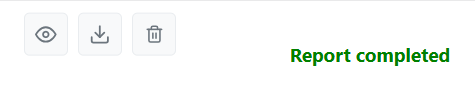
Actions: Each row has three action icons. Hover over an icon to see what it does.
- View Report (eye icon): Opens the Standigger report for the patent. Active once the report is completed.
- Download Report (download icon): Downloads the completed report. Active once the report is completed.
- Delete Row (bin icon): Removes the record from the dashboard. Available for every record.
5. Generate Standigger Report and Download Results in Excel
Generate Standigger Report: Create a Standigger report for any mapped patent in three steps.
- Tick the checkbox next to one or more mapped patents. The footer shows how many rows are selected.
- Click Generate Standigger Report. The button becomes active once at least one patent is selected.
- When the report is ready, the Report Status changes from Report Not Initiated to Report completed, and the View Report and Download Report icons become active for that row (see the Actions screenshot above).
Download Results in Excel: Click Download Results in Excel to export the dashboard results for offline analysis or sharing with your team.

6. Recap: SEP Tagger
SEP Tagger, introduced in version 1.57, helps you find hidden and potential Standard Essential Patents (SEPs). It analyses your selected claims and claim elements, searches across relevant standards, and tags each patent to the standards that may apply.
To start, click Go find Gold under SEP Tagger. You are redirected to the Standigger history page, where the report status moves through In-Progress, Tagging Completed, and Viewing Results and Reports. Once it shows SEP Tagging Completed, click Show Results to open the dashboard.
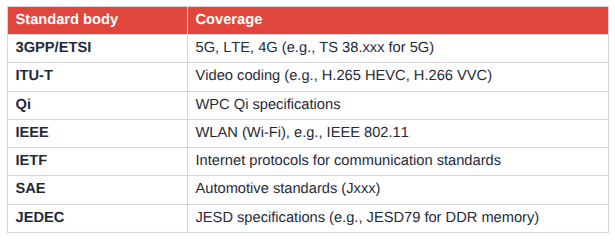
Standards covered:
7. Key Benefits
From tagging to evidence in one place: Move from a standard tag to a claim-element mapping without leaving the dashboard.
Verifiable results: Every mapped claim element links to the exact specification paragraph, section and source.
Faster prioritisation: Weighted Average scores and mapping status show which patents deserve expert review first.
Organised review: Filters, user notes and report status keep large portfolios easy to manage.
Ready to share: Export results to Excel or generate a Standigger report for stakeholders.
ABOUTS US
XLSCOUT is an SOC2 Type II certified, integrated innovation & patent monetization platform at the forefront of the global innovation and IP industry, harnessing the potential of advanced Al technologies like Large Language Models (LLMs) and Generative Al for idea validation, optimizing ideation, creating high-value patents, and monetizing innovation.
- CANADA – Toronto, Ontario
Nucleus @ MaRS Waterfront, Waterfront Innovation Centre, Suite 200, Box 87 – 155, Queens Quay E, Toronto, ON M5A 0W4 - USA – Wilmington, Delaware
1000 North West Street Suite 1200 PMB # 4024, Wilmington DE 19801 - JAPAN – Chiyoda-Ku, Tokyo
XLSCOUT XLPAT G.K., Level 20, Marunouchi Trust Tower – Main 1-6-3 Marunouchi, Chiyoda-Ku, Tokyo, Japan – 100-0005 - INDIA – Mohali, Punjab
Unit 502-503, Tower A, 5th Floor, Bestech Business Tower, Mohali, Punjab – 160055 - GERMANY – Munich, Bavaria
Am Hirtenberg 13, 82064 Straßlach-Dingharting, Deutschland
Phone: +1 (647) 619-0002
Email: contact@xlscout.com
Copyrights © 2025 XLSCOUT. All Rights Reserved.