XLSCOUT Version Release 1.54
Major Updates in ClaimChart LLM
Deep Research’ Beta Version.
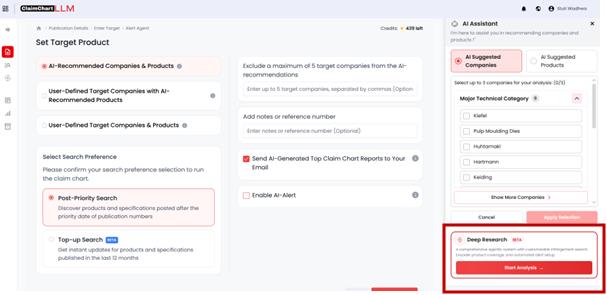
We’re excited to introduce Deep Research, a new capability in ClaimChart LLM designed to help you uncover a broader and more comprehensive set of products compared to the standard workflow. With Deep Research, the system searches and identifies more products across different domains, offering a more extensive view of the product landscape.
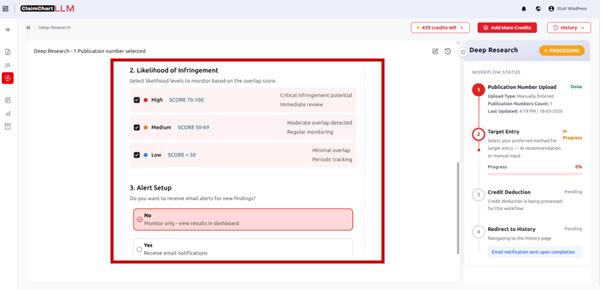
Additionally, the Deep Research algorithm is supported by an Indication Agent, responsible for processing the ‘Likelihood of Infringement’, that classifies the products into three risk tiers: High, Medium, Low.
Getting Started with Deep Research
When you click on “Deep Research”, the system automatically uses your
selected claims and claim elements to begin the process.
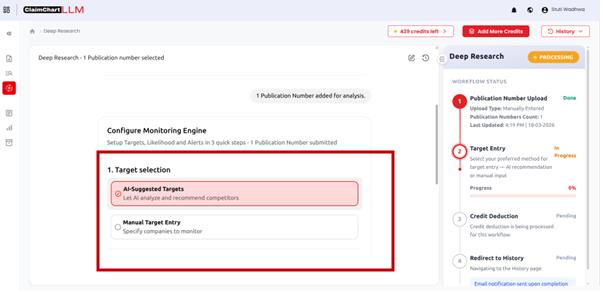
You can proceed in one of two ways:
• AI-Suggested Targets: Let the system automatically identify and
select the most relevant targets for analysis—no manual input
required.
• Manual Target Entry: If you already have specific products in mind,you can manually add up to 3 targets for focused analysis.
Setting Likelihood of Infringement
The next step is setting the Likelihood of Infringement. Here, the system
allows you to select the infringement risk tier (High, Medium, or Low) for the
identified products.
Note: The system will generate Mapping Summaries only for the products
within your selected risk tiers, helping you stay focused on the most relevant
results.
Alerts for Ongoing Monitoring
Additionally, you can also set up automated alerts to stay updated on new
findings. Choose how often you’d like to receive updates:
• Quarterly
• Half-yearly
• Yearly
Viewing Results and Reports
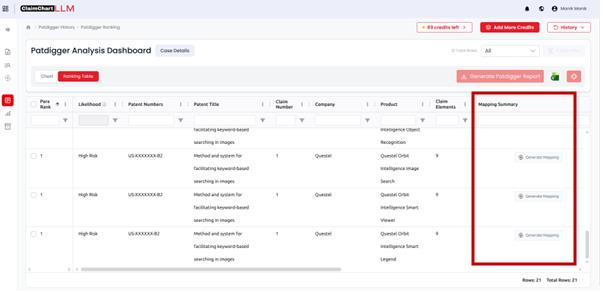
When you open a Deep Research output dashboard from History after you
click on ‘Show Report’:
• You’ll see the complete list of identified products, regardless of the
risk tier selected.
• By default, Mapping Summaries are generated only for your chosen
tiers.
However, you can manually generate a Mapping Summary for any product
using the “Generate Mapping” option.
Minor Updates in ClaimChart LLM
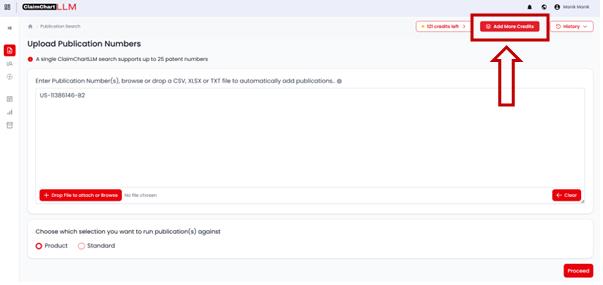
ClaimChart LLM now introduces a new feature, “Add More Credits”,
allowing you to easily replenish their credits directly within the platform.
Add More Credits Feature Details:• Access:
A new “Add More Credits” button is available in the top navigation bar for easy access.
Alternatively, the button will also appear automatically when credits run out, prompting users to top up.• Process:
1. Click the “Add More Credits” Button:
Click the button from the top navigation bar or follow the prompt shownwhen credits are exhausted.
2. Redirect to Credit Purchase Page:
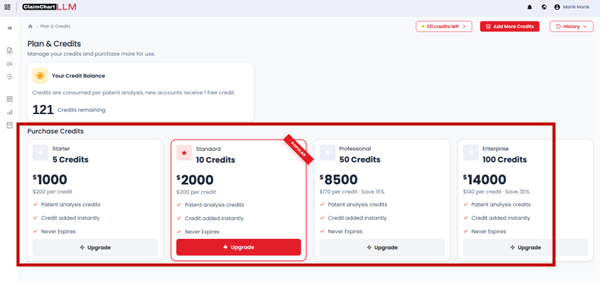
After clicking, you will be redirected to a page where you can
view available credit packages and proceed with the
purchase.
3. Select Credit Package:
You can choose from the following credit packages:
– 5 credits
– 10 credits
– 50 credits
– 100 credits
4. Complete Payment:
You can complete the payment securely using your preferred
payment method.
5. Credits Added to Account:
Credits will be added to your account immediately after
successful payment.
ABOUTS US
XLSCOUT is an SOC2 Type II certified, integrated innovation & patent monetization platform at the forefront of the global innovation and IP industry, harnessing the potential of advanced Al technologies like Large Language Models (LLMs) and Generative Al for idea validation, optimizing ideation, creating high-value patents, and monetizing innovation.
- CANADA – Toronto, Ontario
Nucleus @ MaRS Waterfront, Waterfront Innovation Centre, Suite 200, Box 87 – 155, Queens Quay E, Toronto, ON M5A 0W4 - USA – Wilmington, Delaware
1000 North West Street Suite 1200 PMB # 4024, Wilmington DE 19801 - JAPAN – Chiyoda-Ku, Tokyo
XLSCOUT XLPAT G.K., Level 20, Marunouchi Trust Tower – Main 1-6-3 Marunouchi, Chiyoda-Ku, Tokyo, Japan – 100-0005 - INDIA – Mohali, Punjab
Unit 502-503, Tower A, 5th Floor, Bestech Business Tower, Mohali, Punjab – 160055 - GERMANY – Munich, Bavaria
Am Hirtenberg 13, 82064 Straßlach-Dingharting, Deutschland
Phone: +1 (647) 619-0002
Email: contact@xlscout.com
Copyrights © 2025 XLSCOUT. All Rights Reserved.
